
LED WALL PLANNING / RUNS IN THE BROWSER
Power maps, data maps and cable labels from one LED wall layout.
You draw the wall, pick the tile and the processor, and set the voltage, breaker size and derate. Raster Logic works out tiles per circuit, runs per port and every tile's place in the raster, then prints the cable worksheet, the labels and the reports. It runs in the browser. Native Mac and Windows apps are planned.
- In
- Layout, tile, processor, voltage, breaker, derate, cable types
- Out
- Pixel map, power map, data map, system wiring, cable worksheet, labels, reports
01What it makes
Every document is generated from one layout.
For LED and video techs, power and rigging crew, AV integrators, and rental and staging houses. Lay the wall out once; the maps, the worksheet and the labels are generated from it and stay in step when it changes.
| ID | Item | Spec | Fig. |
|---|---|---|---|
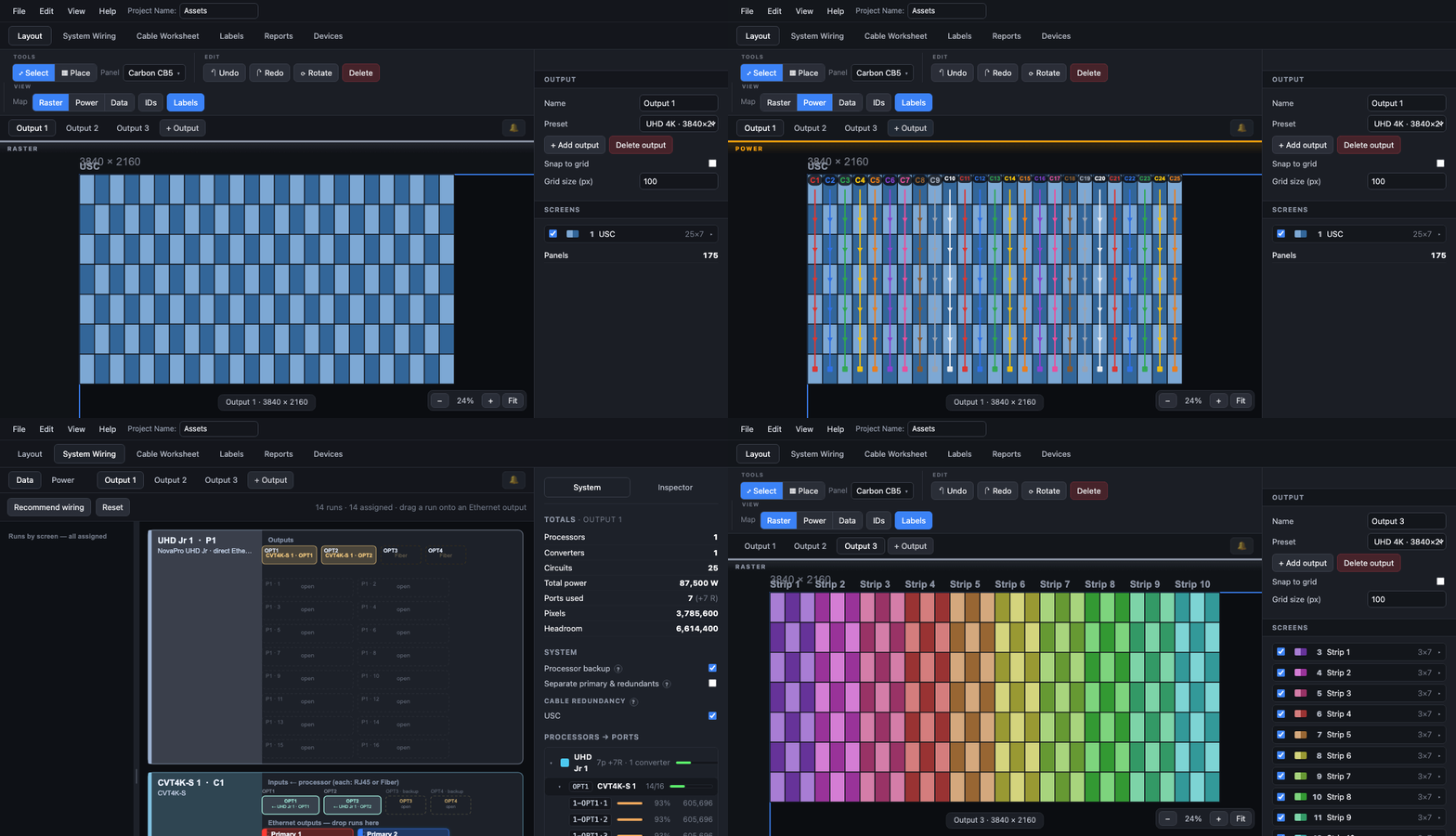
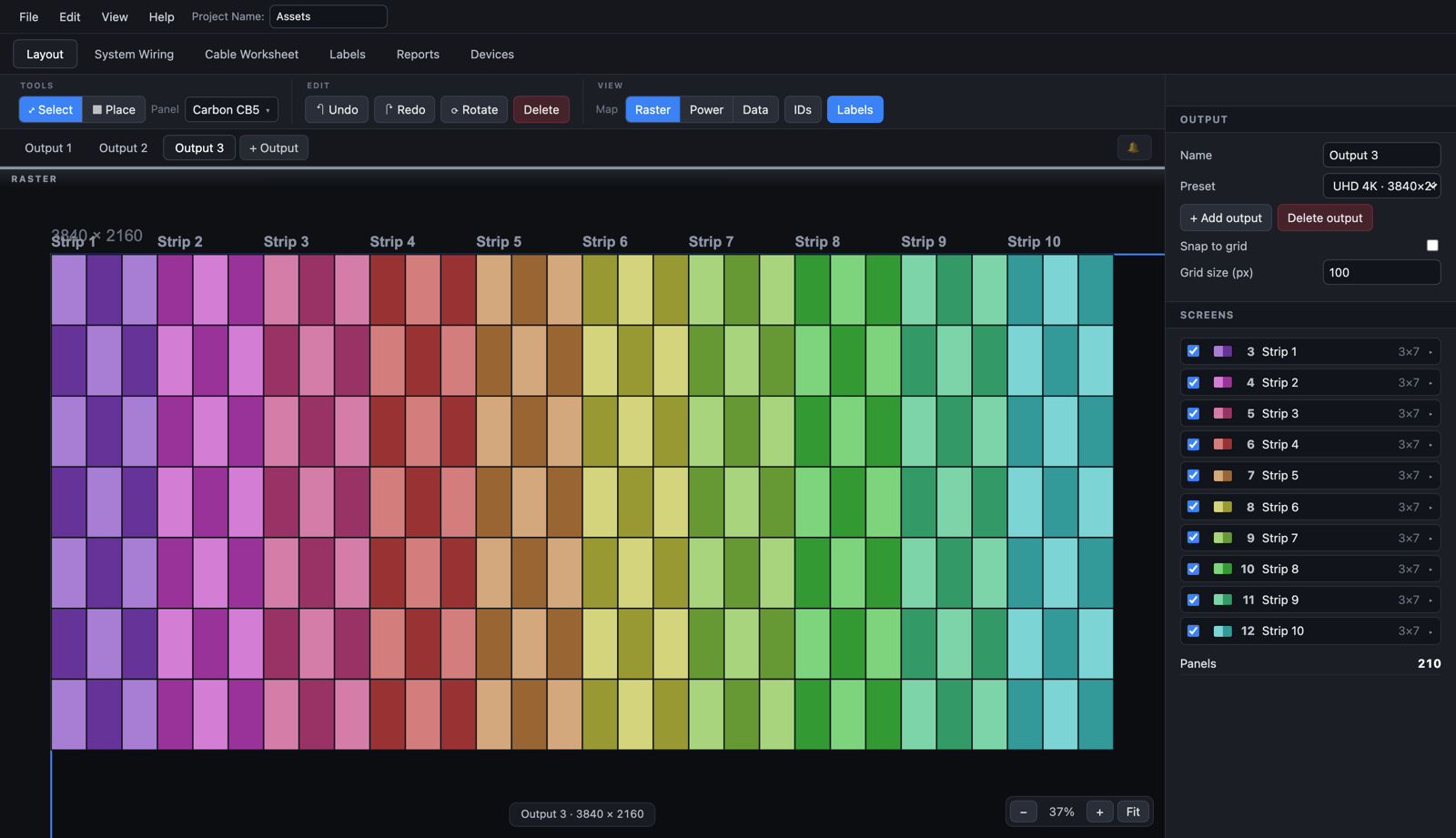
| 01 | Layout | Screens are drawn tile by tile from the panel library. Several screens and several video outputs per project. Wall size in meters and feet, weight, pixel count and total watts update as tiles are placed. | Fig. 01 |
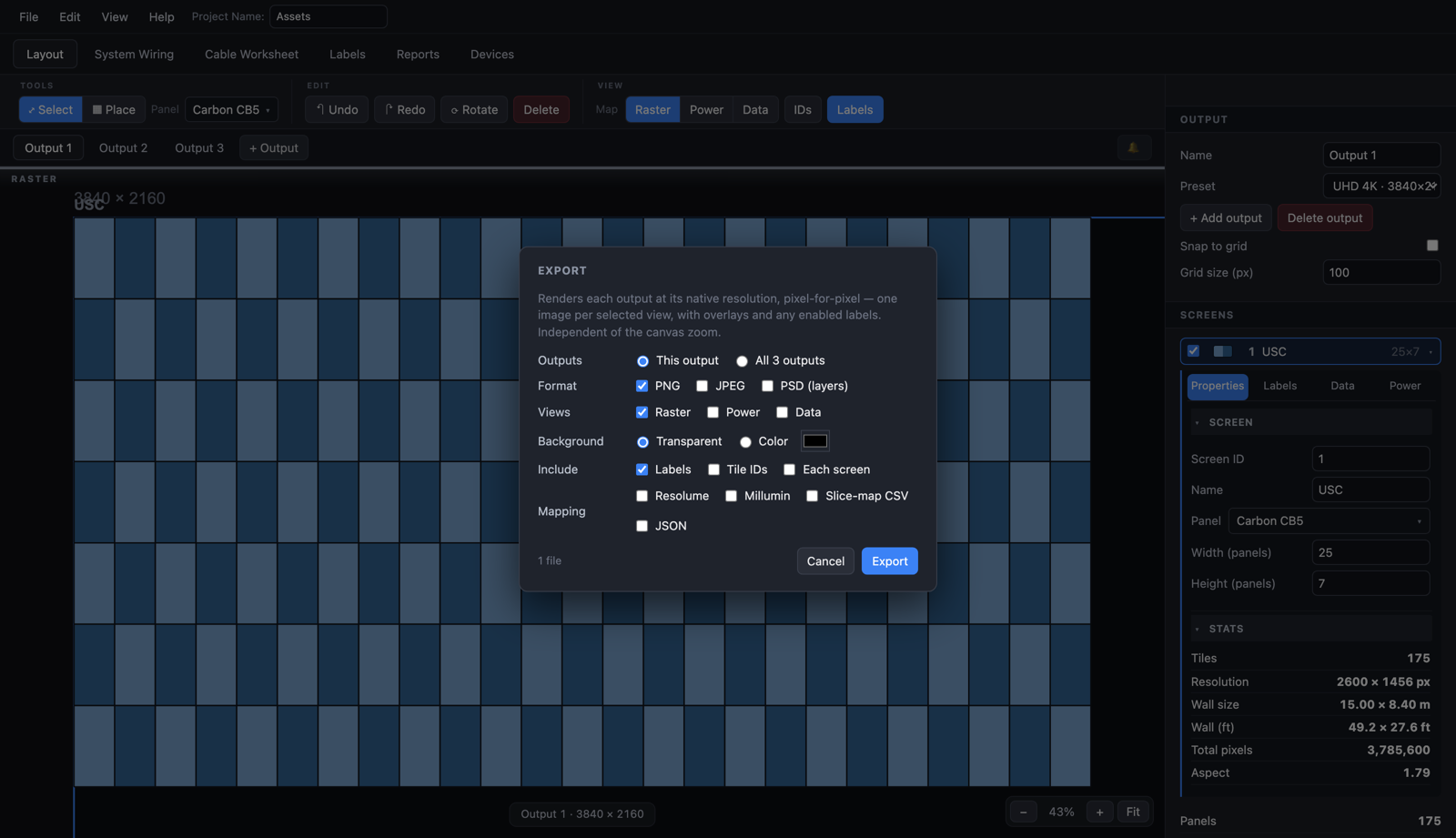
| 02 | Pixel map | Each tile's x, y and size in the raster. Exports as a processor color map, PNG, JPEG, layered PSD, Resolume Arena and Millumin mapping files, or a slice map as CSV or JSON. | Fig. 09 |
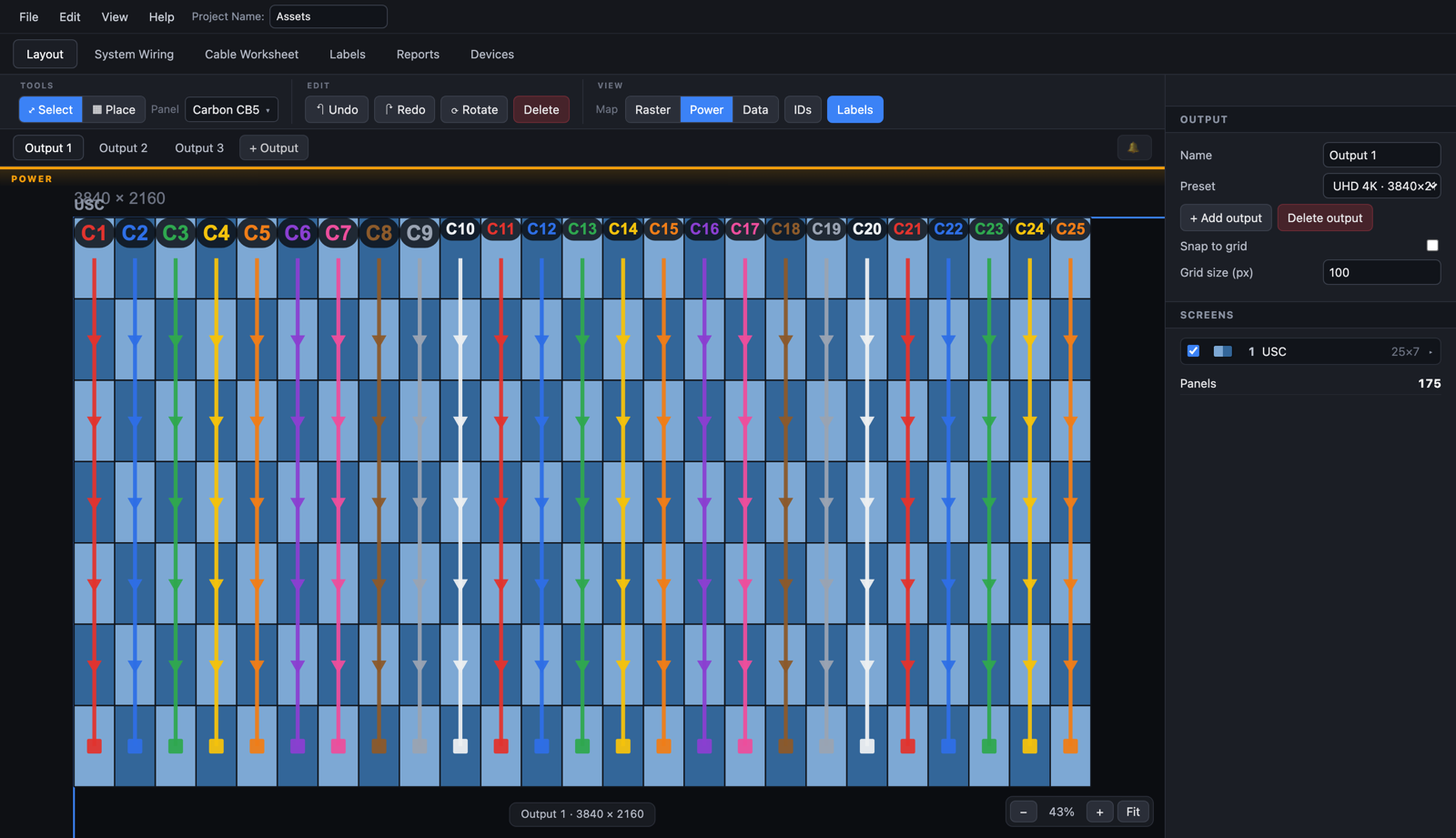
| 03 | Power map | Tiles per circuit = voltage x breaker x derate / watts per tile. The derate defaults to 0.8 (the NEC continuous-load rule) and is set per screen; 1.0 uses the full breaker with no headroom. The formula prints on the map. See the worked example below. | Fig. 02 |
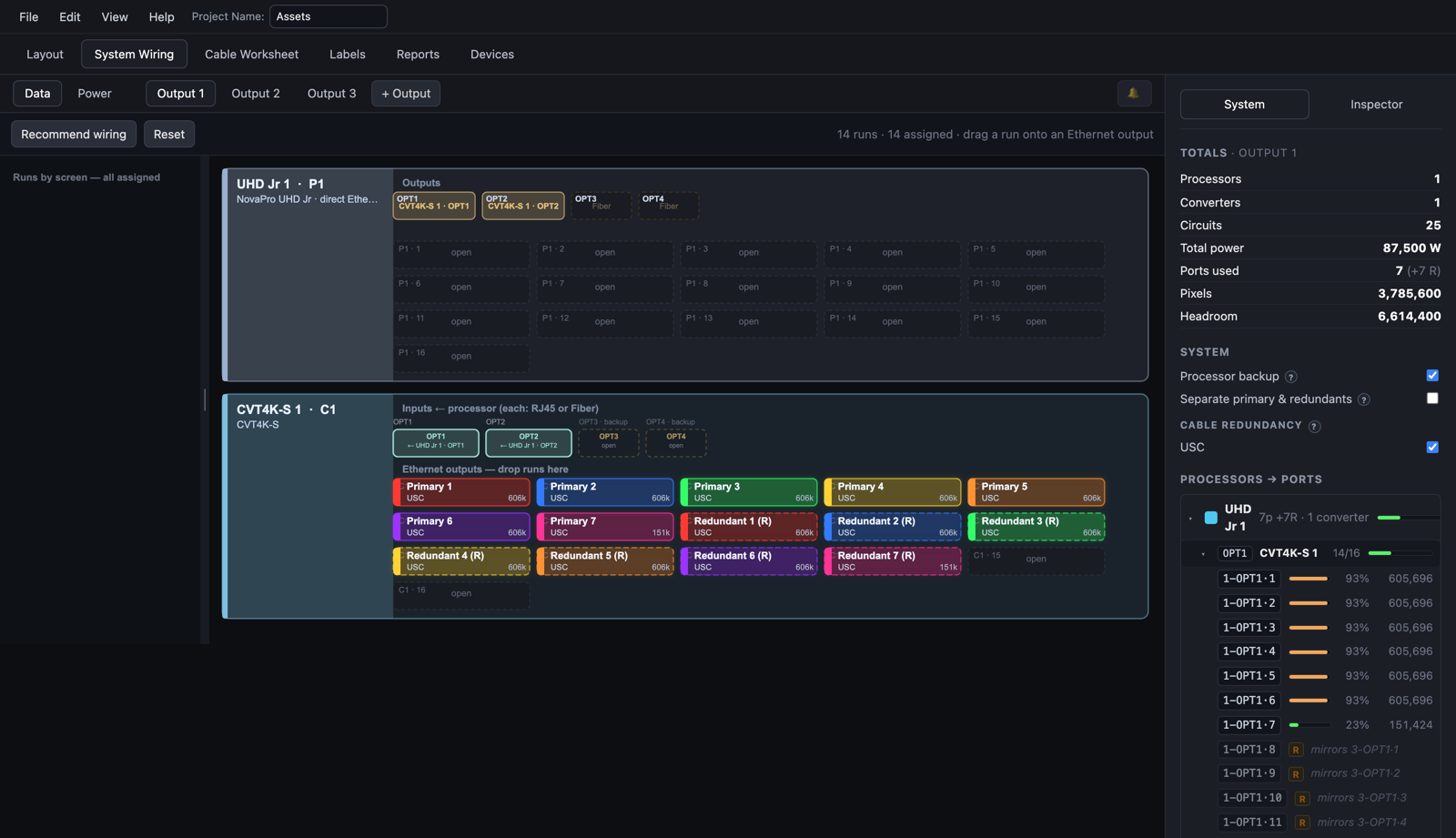
| 04 | Data map | Choose the processor. Runs stay inside its port count and pixels per port. Primary and redundant runs are drawn, numbered and colored. | Fig. 03 |
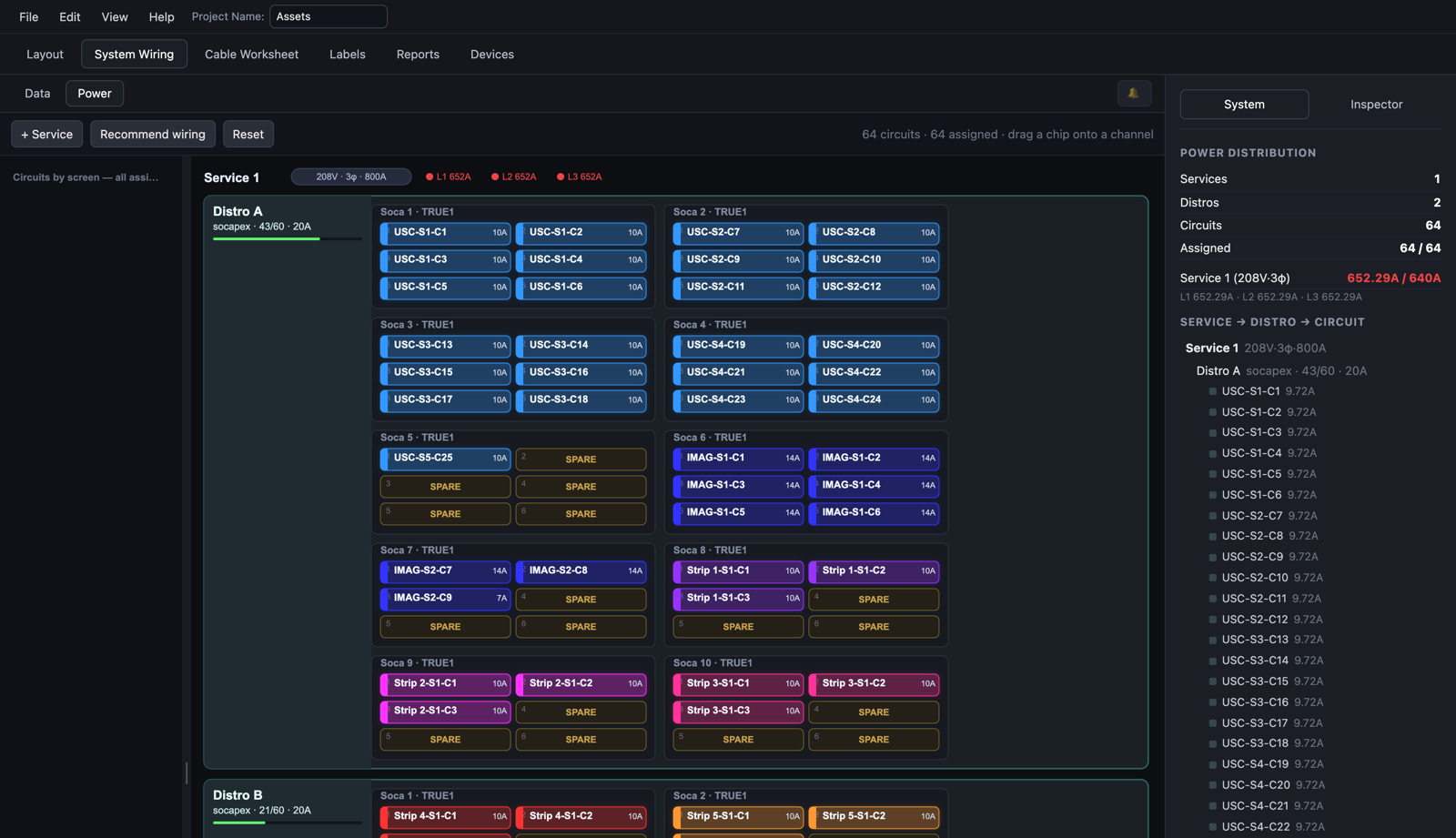
| 05 | System wiring | Services, distros, socapex breakouts, processors and fiber converters on one board. Circuits and runs are assigned to channels and ports; load per service and per leg is shown and an overload is flagged. | Fig. 04 |
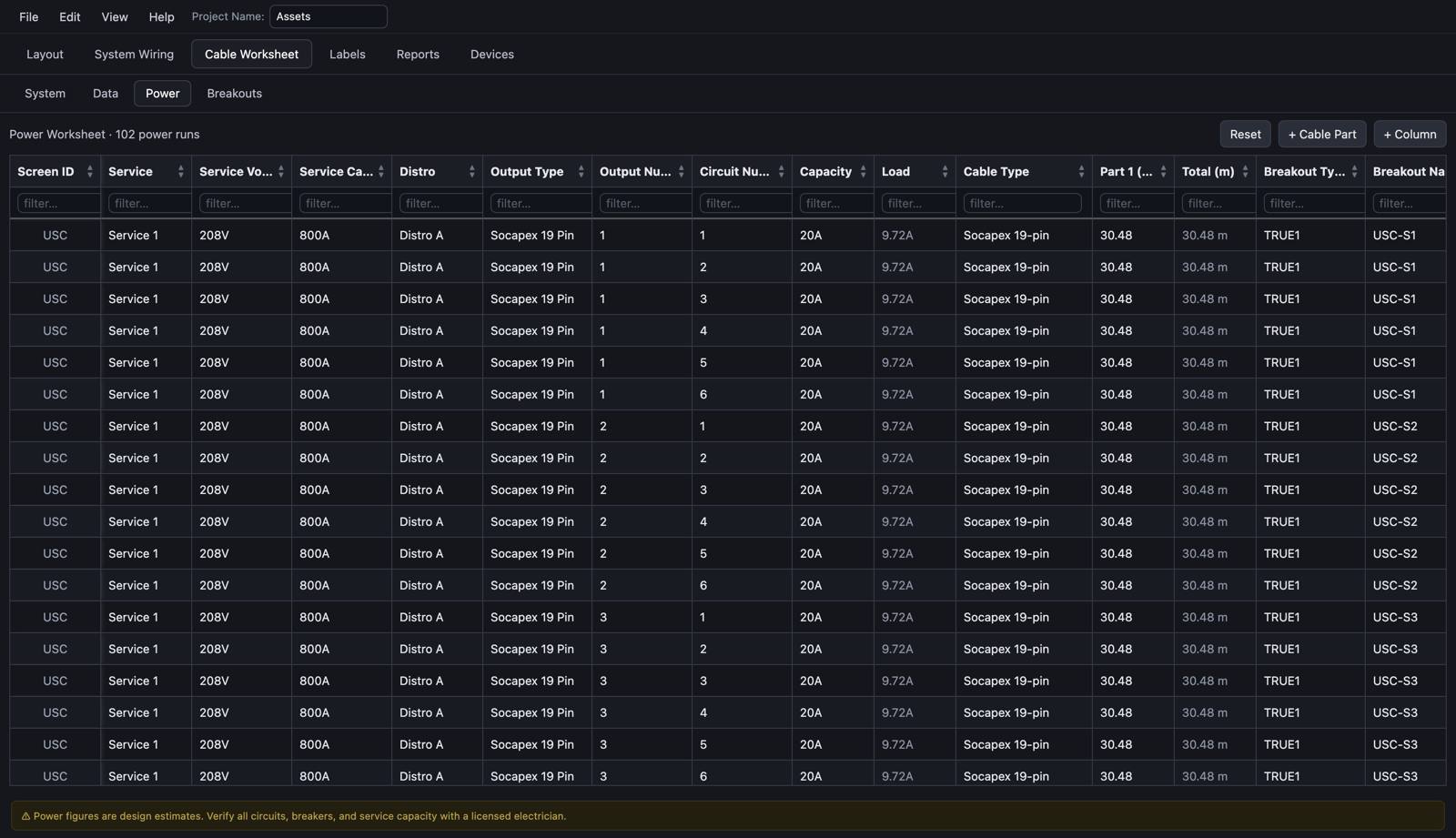
| 06 | Cable worksheet | Every run is a row: screen, service, distro, circuit, cable type, segment lengths, loom and breakout. Sort, filter and add columns. | Fig. 05 |
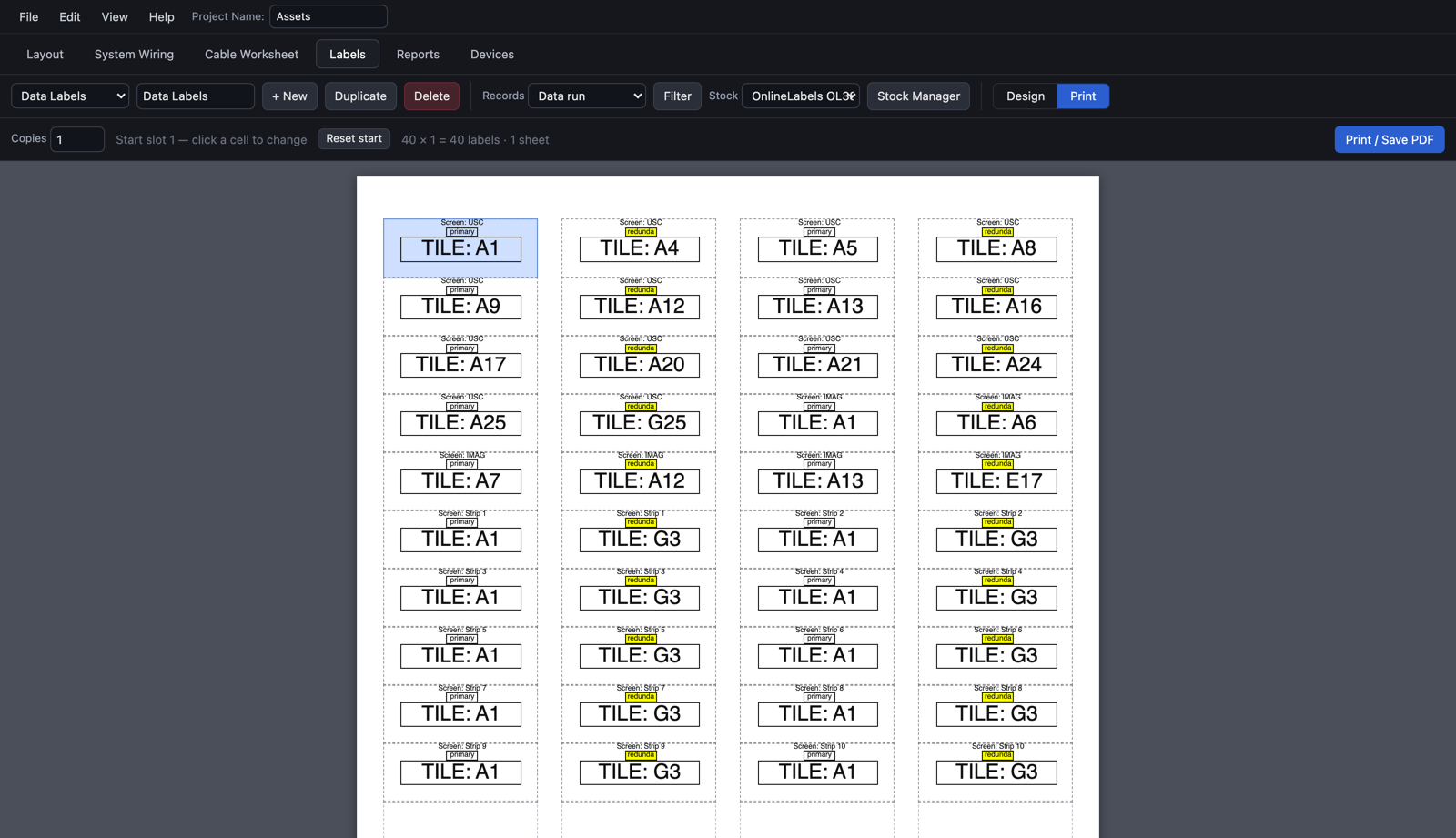
| 07 | Labels | Sheets for Avery 5160, 5163 and 5395 and OnlineLabels OL875 and OL385WG stock, or a custom sheet. Fields bind to worksheet records, and a conditional rule can flag a redundant run. Live preview, then print or save as PDF from the browser. | Fig. 06 |
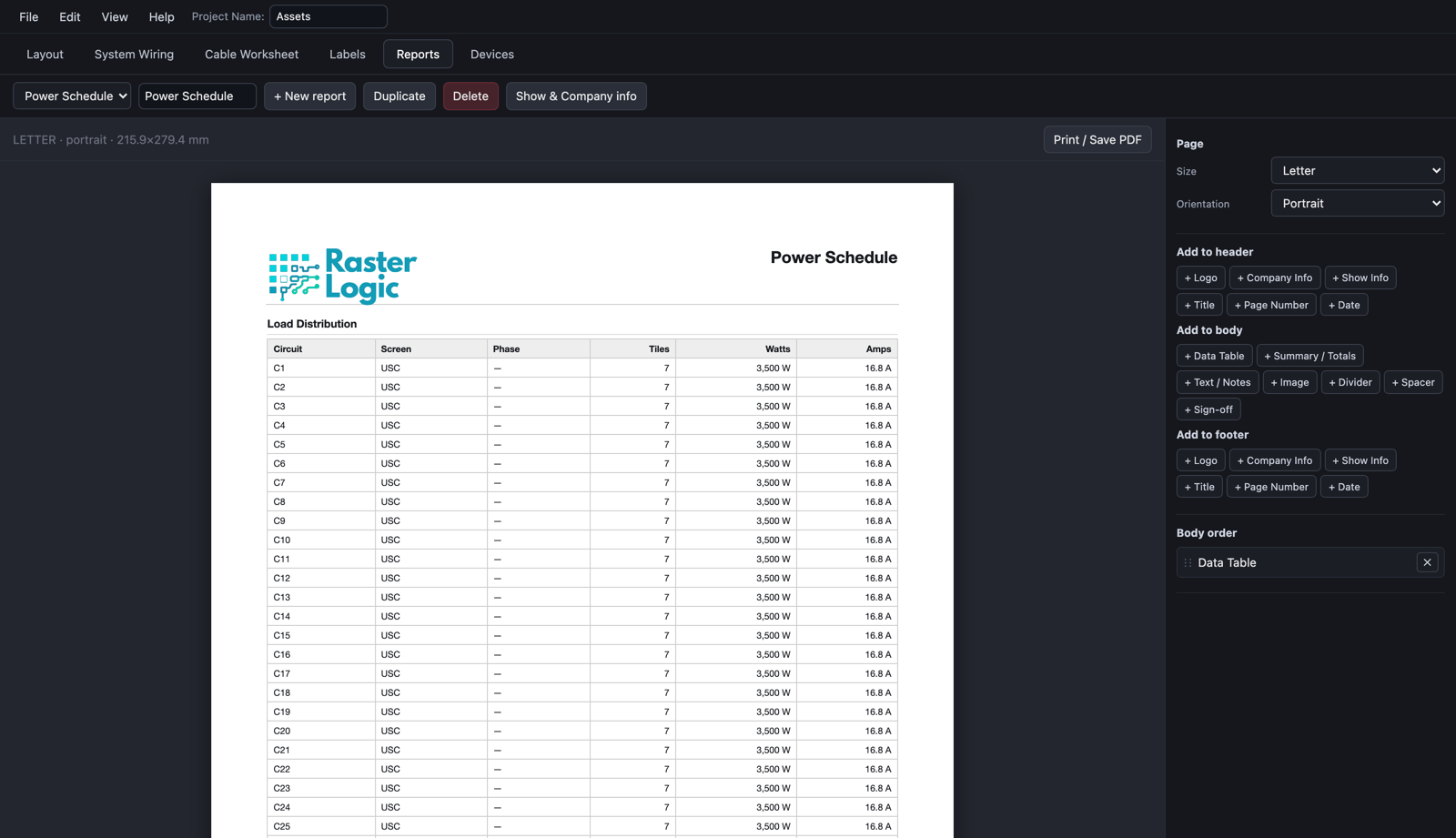
| 08 | Reports | Power schedule, processor schedule and custom reports on Letter or A4, printed to PDF. Your logo and company block in the header on Studio. | Fig. 07 |
| 09 | Cloud library | Projects save to your account and open from any browser. The editor also autosaves locally while you work. | Fig. 01 |
Power, worked
circuit budget = voltage x breaker x derate
| 208 V x 20 A x 0.8 | = 3,328 W | 6 tiles at 500 W max |
| 208 V x 20 A x 1.0 | = 4,160 W | 8 tiles at 500 W max |
| 120 V x 20 A x 0.8 | = 1,920 W | 3 tiles at 500 W max |
Fig. 02 shows one column of 7 tiles per circuit at 3,500 W and 16.8 A: that screen uses clean cabling (a whole column per circuit) at a derate above 0.8.
02From a real show
Three outputs, 470 panels, NovaStar UHD Jr.
Every screenshot on this page is from one production project, captured from the app without retouching. Click a figure to enlarge it.
03Hardware library
Port counts and pixel budgets come from the datasheets.
Every processor in the library carries its output count, its per-port pixel budget and its redundancy model. Panels carry pitch, size, weight and maximum and average watts. Datasheet filenames and extraction dates are recorded against each device.
- Brompton
- Tessera SX40, S4, S8, XD, XD-S and XD-T, with the Tessera output capacity table and closed-loop redundancy where the processor supports it.
- NovaStar
- NovaPro UHD Jr; MCTRL300, 500, 600, 660, 660 Pro, 700, 700 Pro, R5 and 4K; COEX MX20, MX30, MX40 Pro, CX40 Pro and KU20; VX400 Pro, VX600 Pro, VX1000 Pro and VX2000 Pro; CVT10, CVT10 Pro, CVT310, CVT320, CVT4K-M and CVT4K-S fiber converters.
- Panels
- ROE Visual Carbon CB5 and CB5 Half, plus the Topaz, Graphite, Black Marble, Black Pearl, Black Quartz, Vanish and V8 series, and Absen PL Pro V3, SA, MR and PR. Add your own panel from its datasheet: pitch, size, weight, watts maximum and average, pixels. Processors and converters are curated.
- Power model
- Tiles per circuit = voltage x breaker x derate / watts per tile. Default derate 0.8, set per screen up to 1.0. Single-phase and three-phase services, distros, socapex breakouts, per-leg load.
- Data model
- Runs allocated inside port count and pixels per port; primary and redundant runs; Brompton loop redundancy or NovaStar port backup as the processor supports.
- Label stock
- Avery 5160, 5163 and 5395; OnlineLabels OL875 and OL385WG; or a custom sheet you size yourself.
04Rates
Rates
Every account starts with 30 days of Pro. No card, one trial per email. When the 30 days end the account is view-only: projects still open, but editing, printing and export need a plan. Pro is per person, monthly or yearly. Studio is per seat, yearly, for shops with more than one person on the drawings. Checkout and tax are handled by Paddle, the merchant of record.
| Item | Rate | Billed | Action |
|---|---|---|---|
Pro One person. Every feature: maps, wiring, worksheet, labels, reports, multi-output export, cloud library. | $17.33per month $207.95 billed yearly. | Once a year, 9% less than paying monthly. |
| Item | Trial (30 days) | Pro | Studio |
|---|---|---|---|
| Layout, several outputs per project | Yes | Yes | Yes |
| Power, data and pixel maps | Yes | Yes | Yes |
| System wiring and distribution | Yes | Yes | Yes |
| Cable worksheet and looms | Yes | Yes | Yes |
| Labels, print and PDF | Yes | Yes | Yes |
| Reports | Yes | Yes | Yes, under your own brand |
| Export: PNG, JPEG, PSD, color map, Resolume, Millumin, CSV, JSON | Yes | Yes | Yes, plus bulk export |
| Cloud project library | Yes | Yes | Yes, shared across seats |
| Priority support | No | No | Yes |
| After the trial | View only | Active | Active |
View only means projects open and can be read, but not edited, printed or exported. Cancel from the account page; access runs to the end of the paid period.
05Questions
Questions
- Do I need to install anything?
- No. Raster Logic runs in the browser. Native Mac and Windows apps are planned.
- What happens after the 30-day trial?
- The account goes view-only. You can open and read your projects, but editing, printing and export need a Pro or Studio plan. The trial is one per email and needs no card.
- Can I change the 0.8 derate?
- Yes, per screen. The budget is voltage x breaker x derate, and the formula prints on the power map. Setting 1.0 uses the full breaker with no headroom. The app never packs a circuit past the budget in any sizing mode.
- Which panels and processors are in the library?
- Brompton Tessera SX40, S4, S8, XD, XD-S and XD-T; NovaStar NovaPro UHD Jr, the MCTRL, COEX and VX Pro series and the CVT fiber converters; ROE Visual and Absen panels. Specs come from the manufacturers' published datasheets. You can add your own panels; processors are curated.
- Can I send the maps to my media server?
- Yes. Export mapping files for Resolume Arena and Millumin, or a generic slice map as CSV or JSON, alongside the processor color map.
- What can I export?
- PNG, JPEG and layered PSD per output, processor color maps, the Resolume, Millumin and slice-map files, and PDF for reports and label sheets. View-only accounts cannot export.
- What label stock does it print on?
- Avery 5160, 5163 and 5395, OnlineLabels OL875 and OL385WG, or a custom sheet. The label designer previews the sheet and prints from the browser or saves a PDF.
- Where are my projects saved?
- In your account's cloud library, and the editor autosaves locally while you work.
- How do I cancel?
- From the account page. Access runs to the end of the paid period. Paddle is the merchant of record and collects sales tax and VAT.
Ready to try it?